Why more than one Claude account can be needed
Many professionals use Claude with more than one account. One is the account the company or the practice pays for the team, under the terms the organisation has agreed to. Another is a personal subscription, used for training, for personal projects or for a second engagement. People who work for several clients sometimes have one account for each.
Keeping the accounts separate meets three needs. The first is confidentiality: a client's documents stay in the account of the organisation that is responsible for them. The second is order: each account keeps its own history, its own projects and its own connections to other services. The third is cost: the usage is borne by whoever has to pay for it.
Claude Desktop, Anthropic's application for Mac and Windows, allows one sign-in at a time: moving from one account to another means signing out and back in. A request to manage several accounts in the same application was opened on 15 January 2026 in the public Claude Code repository on GitHub, as number 18435, and is still open on the date of this article. Among the problems described by those who support it are connections to other services that drop at every account switch, and usage billed to the wrong account.
Titanium Profiles keeps several Claude Desktop accounts open
Titanium Profiles is a free application for macOS and Windows, developed by G&G Technologies. It gives each profile its own data folder and starts a separate Claude Desktop for each one, with its own sign-in. The company account and the personal one stay open side by side, each in its own window.
Each profile has a name, a colour, an icon and a note, and can have a keyboard shortcut that opens it from any application. A menu in the Mac menu bar, or in the Windows notification area, lists every profile. A profile can also have its own Claude Code folder. Claude Code is the Anthropic tool that writes and edits program code, and with its own folder the sessions started from that profile keep their own settings and history.
For each profile, the app also estimates the cost of Claude Code usage at Anthropic's API list prices. The API is the service through which programs use Claude and pay for what they consume, according to the tokens processed; tokens are the units into which the model splits the text it reads and writes.
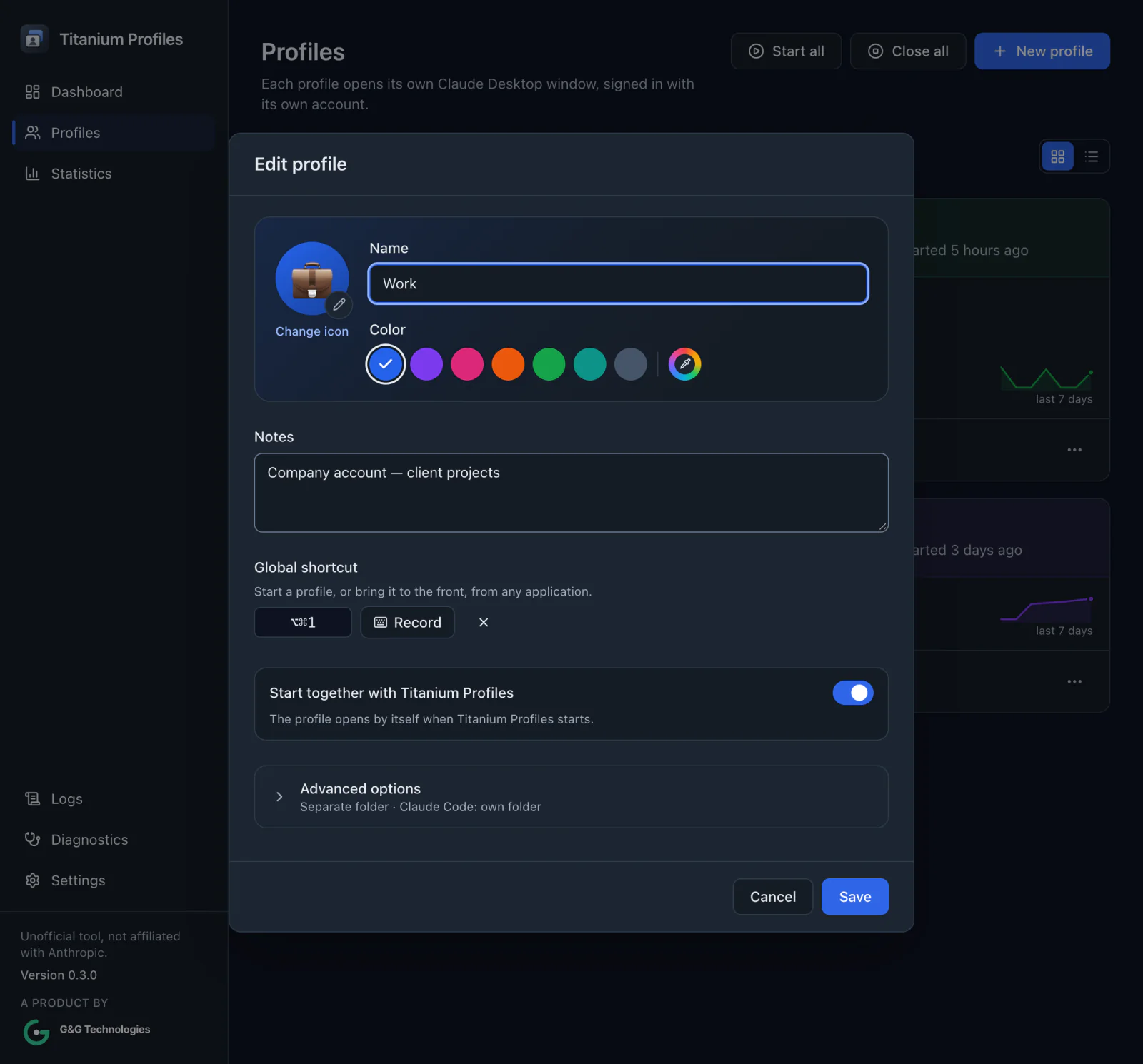
The people described below have different needs. For each of them, the example shows how Titanium Profiles is used and what it brings.
A law firm keeps client documents in the firm's account
A lawyer in a partnership uses the firm's team account for case files: contracts to review, pleadings to summarise, correspondence to prepare. To write an article for a journal or prepare a lecture, the same lawyer uses a personal subscription instead.
With Titanium Profiles the two accounts become two profiles, for example ‘Firm’ in blue and ‘Personal’ in green. Name and colour tell the profiles apart in the overview and in the menu, so the account is chosen before the document is opened. A client contract is thus opened in the firm's account, and remains subject to the terms the firm has agreed with Anthropic. The conversations about case files stay in the firm's history, and personal material stays in the personal one.
The benefit is a visible boundary between client work and everything else. The same pattern suits a consultant who works for several clients, each with its own company account: one profile per client, named after the client.
A developer separates company work from personal projects
A developer uses Claude Code with the company account for company code, and with a personal subscription for an open source project maintained in spare time.
Each profile has its own Claude Code folder, so the sessions of the two accounts stay distinct. MCP servers are configured once and copied from one profile to another. MCP, the Model Context Protocol, is the open standard through which Claude connects to external tools, for example a folder of files or a ticketing system. Before copying, the app shows which servers will be copied, hides keys and tokens and saves a backup of the destination configuration.
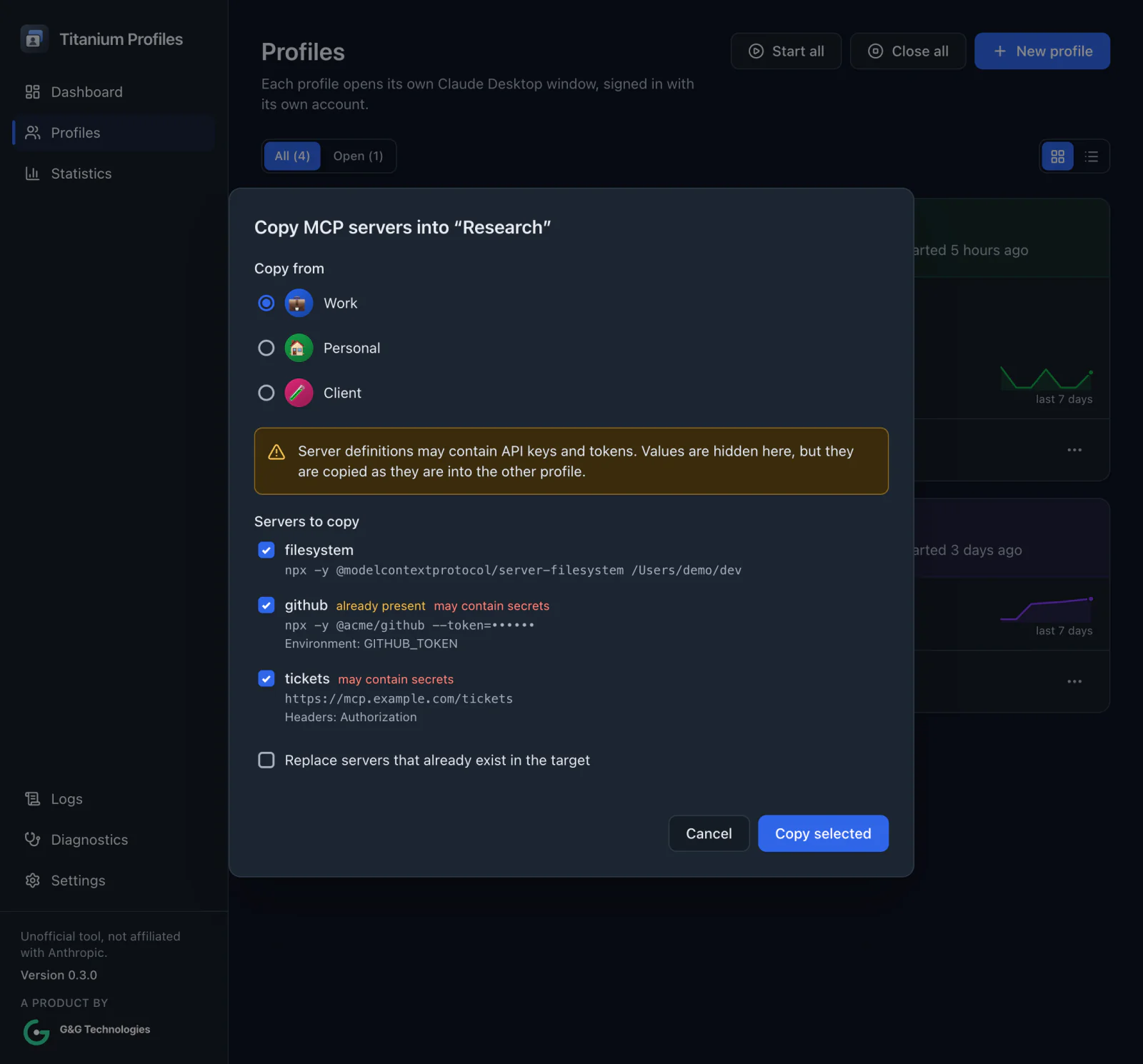
The benefit is twofold. Company code stays in the company account, and the configuration of the tools is written only once. The statistics also show what the work done in each profile would cost at list price, a figure that helps when a subscription has to be justified.
An executive assistant works across several accounts without signing out
An executive assistant works for two companies in the same group, each with its own team account. Minutes, correspondence, notes and documents are prepared for both, often within the same hour.
With one profile per company, both Claude Desktop windows stay open. A keyboard shortcut brings the right one to the front, and the menu bar menu shows which profiles are open. The overview gives the state of each profile and lets it be started, brought to the front, closed or restarted. Titanium Profiles can be used entirely from the keyboard and with a screen reader, and the light and dark themes meet the AA contrast level of the WCAG accessibility guidelines.
The benefit is that moving from one company to the other takes a shortcut instead of a new sign-in, and every document stays in the account of the company it belongs to.
A manager measures costs before choosing between subscriptions and the API
A department head has to decide how to bring Claude Code to the team. One option is a seat for each person on a team plan, at a fixed fee; the other is the API, paying for the tokens consumed. The two cost differently, and the choice depends on how much the team actually uses the tool.
Anthropic's documentation suggests starting with a small pilot group and measuring its usage before a wider rollout. Titanium Profiles produces that measurement on the pilot group's computers. The statistics report, for each profile, the estimated cost at list price, the sessions, the tokens and the cost per day split by model. The period can be seven, thirty or ninety days, the current month or the current year, and the data can be exported.
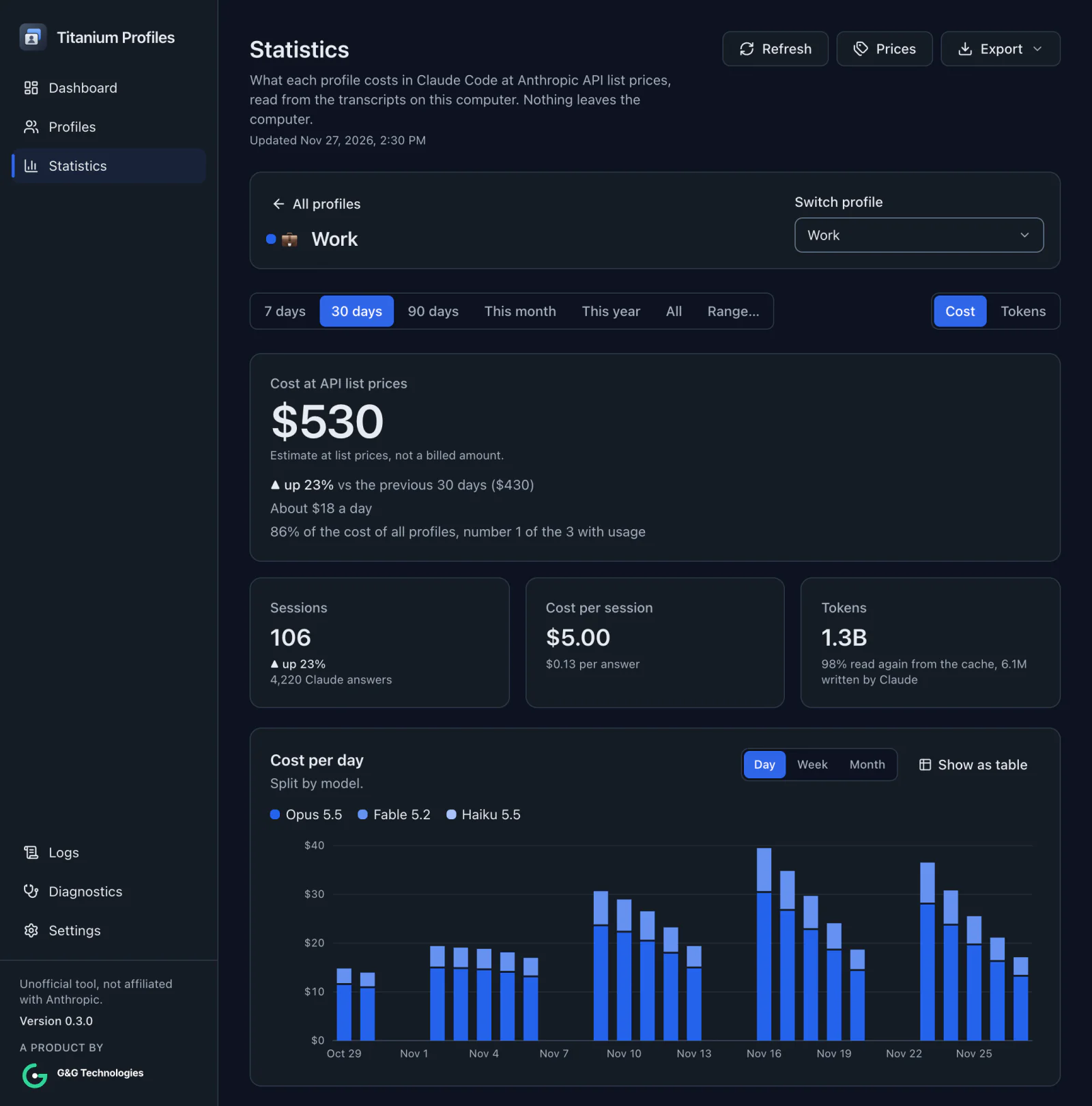
The benefit is a decision based on usage measured in the team itself. The figures remain estimates, and the section on reading the estimate explains what they represent.
A business owner keeps activities separate and compares their usage
A business owner runs two companies and uses Claude for both, as well as personally. What matters is that each company's work stays in that company's account, and that each account is used for the activity that pays for it.
With one profile per company, the overview shows on one screen which profiles are open and what the Claude Code usage of today and of the last seven days is worth at list price, profile by profile. A separate section points out what needs attention, for example a profile that did not close in time.
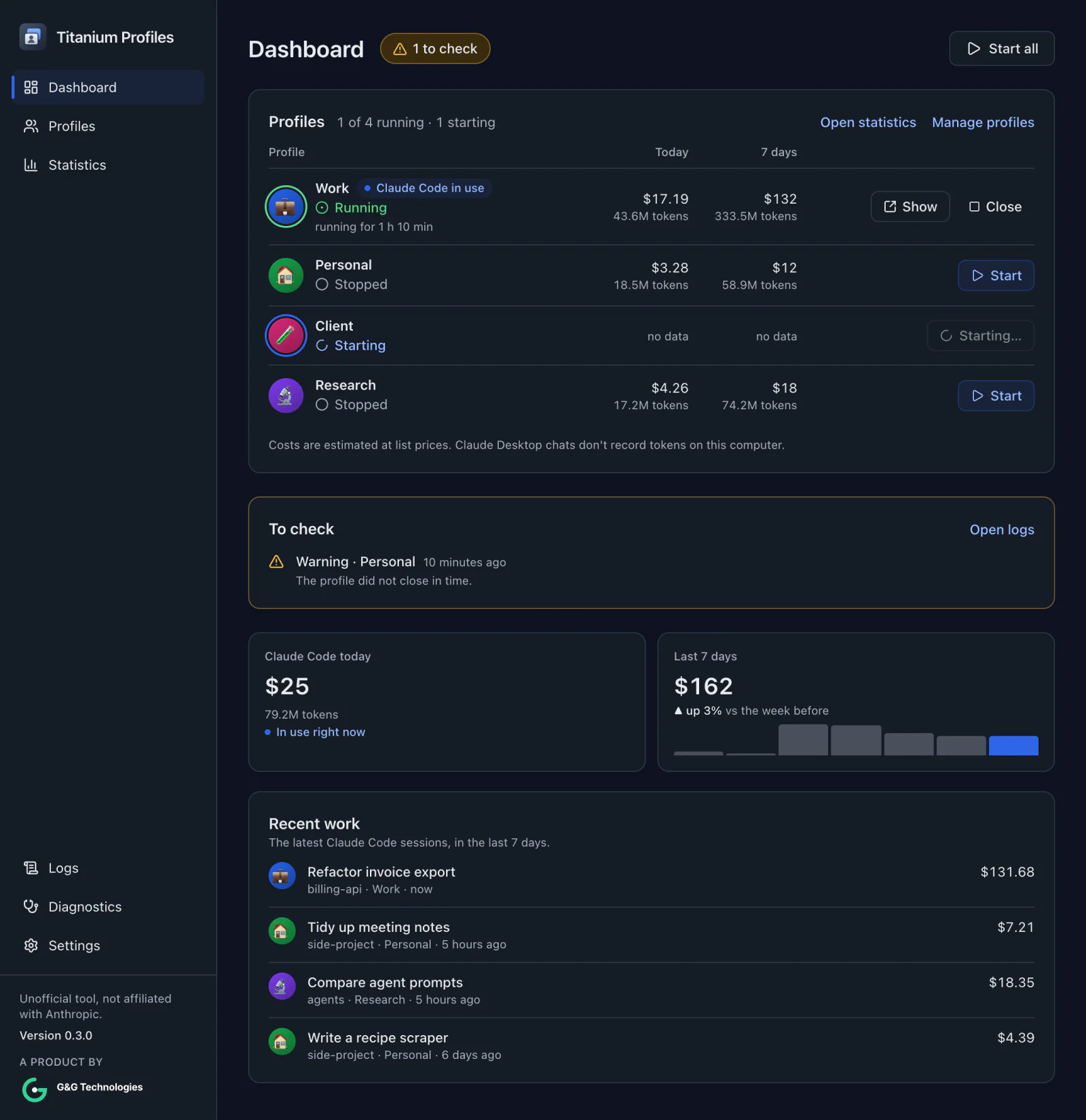
The benefit is an overall view of how Claude is used across the different activities, with the data of each kept separate.
How to read the cost estimate
Titanium Profiles multiplies the tokens that Claude Code has recorded on the computer by Anthropic's API list prices, model by model. The tokens are read from the session transcripts that Claude Code saves on the computer, and the calculation takes place entirely on the computer.
Three clarifications help to use the estimate correctly.
- The estimate is not an amount charged. With a Pro or Max subscription, Claude Code usage is included in the fee, as Anthropic's documentation states. The estimate says what the same work would cost if paid for by consumption through the API.
- The estimate covers Claude Code only. Conversations in the Claude Desktop chat do not record tokens on the computer, so they are not counted.
- The estimate uses list prices. An organisation that has agreed different rates with Anthropic pays different prices.
The limits of Titanium Profiles
Titanium Profiles is an unofficial tool, not affiliated with Anthropic. Claude Desktop stays as it is: the app does not modify it, copy it or alter it. It does not read cookies, session tokens or credentials, and it does not filter or monitor the data exchanged with Claude.
The only outbound communication is one request a day to the G&G site to learn the latest version, with nothing but the app's name and version. The check can be turned off.
How to start using Titanium Profiles
- Download Titanium Profiles from the app's page. It requires macOS, or Windows 10 or 11, and Claude Desktop already installed.
- Create a profile for each account, with a name and a colour that make it recognisable.
- Start each profile and sign in with the matching account.
- Assign a keyboard shortcut to the profiles used most often.
- To compare subscription and API, open the statistics after a few weeks of work.
Titanium Profiles is part of the Titanium suite. The other apps are described on the G&G products page.
Sources
This article is for information purposes only. The behaviour of Claude Desktop and Claude Code and the API prices are those documented by Anthropic on the date of publication, and may change.